ChiYu Code Journey

安安,我是 ChiYu!

昨天,我們完成了前端開發的最後一份規劃文件。至此,我們所有的「左手藍圖」工作,全部大功告成!

從今天起,我們將正式拿起工具,戴上安全帽,開始 Vibe Coding 的前端實作!但… 我們真的要像傳統的「建築工人」那樣,一行一行地去搭建 HTML 骨架,再一點一點地去粉刷 CSS 樣式嗎?

不!時代變了!今天,我們要直接從「建築工人」一步到位,升級成「魔法建築師」!我們不再一磚一瓦地蓋房子,我們要直接攤開我們的設計藍圖,對著 Gemini 詠唱咒語,瞬間召喚出一棟功能完整、外觀精美的 UI 原型!

Part 1:為什麼要用 Canvas?—— 從「盲人摸象」到「上帝視角」

在 Day 12,我們體驗了在終端機 Vibe Coding 的快感。它很酷,但對於 UI 開發來說,它有個小缺點:我們就像是在黑暗中「盲人摸象」,敲下一行指令,然後切換到瀏覽器看看成果,來來回回,效率不高。

而 Gemini Web UI 的 Canvas 功能,則給了我們截然不同的體驗——「上帝視角」。

Canvas 是一個視覺化的 AI 互動介面,它能讓我們在描述需求的同時,即時預覽 AI 生成的 UI 畫面。它追求的是 「極速視覺化」,讓我們能在幾分鐘內,就得到一個可以直接互動、外觀精美的 UI 原型。這對於前端開發來說,簡直是夢幻般的工具!

Part 2:Canvas 實戰:為 AI 建築師提供「設計圖」

現在,讓我們打開我們的「魔法實驗室」—— gemini.google.com,然後選擇 Canvas 功能。我們要學習一門全新的 Prompt 技巧:如何用文字,向一位魔法建築師描述一棟房子?

答案很簡單:把我們嘔心瀝血產出的設計文件餵給它!

【魔法詠唱:UI 生成咒語】

# 角色 (Role)
你是一位頂尖的前端工程師,精通 HTML, CSS, JavaScript,並且對 UI/UX 設計有深刻的理解。

# 目標 (Objective)
請根據我提供的設計文件和詳細需求,為我生成一個功能完整的「習慣追蹤器」Web UI 的**單一 HTML 檔案**

# 上下文 (Context)

- **風格指南**: STYLE_GUIDE.md
- **佈局與元件**: LAYOUT_COMPONENTS.md
- **核心使用者故事**: USER_STORIES.md
- **專案章程**: PROJECT_CHARTER.md

---

## 你的任務與產出要求 (Your Task & Output Requirements)
1. **單一檔案**: 請將所有的 HTML, CSS, 和 JavaScript 都寫在同一個 `.html` 檔案中。
2. **HTML 結構**:
- 嚴格遵循「佈局與元件」文件中定義的兩欄式佈局 (`Side Navigation` + `Main Content Area`)。
-`Main Content Area` 中,實現 `PageHeader``HabitList` 元件。
- `HabitList` 中請包含至少三個靜態的習慣項目作為範例。
3. **CSS 樣式**:
- 嚴格遵循「風格指南」中定義的顏色、字體和間距系統。
- 所有樣式都必須寫在 `<style>` 標籤中。
4. **JavaScript 功能**:
- 所有的互動邏輯都必須寫在 `<script>` 標籤中。
- 實現「新增習慣」按鈕的功能:點擊後會彈出一個 Modal 視窗。
- 實現 Modal 視窗的關閉功能。
- 實現習慣項目的「打卡」功能:點擊習慣項目後,會有視覺上的變化(例如加上刪除線)。

Gemini Canvas Prompt

當你把這個包含了所有設計細節的交給Gemini時,要記得點選Canvas的選項。

Part 3:成果展示:見證魔法召喚的建築

只需片刻,Gemini Canvas 就會在你面前,呈現出一個讓你驚嘆的成果:

左邊是精美的 UI 即時預覽,右邊是滾動的程式碼。

這就是我們召喚出來的 UI 原型!它不只是一張圖片,它是一個可以立刻下載、可以立刻互動的真實網頁!

讓我們來欣賞一下 AI 建築師的傑作:

(程式碼有點長,但我還是打算全部放上來,太長可以滑下去就好,後面有更精華的說明)

<!DOCTYPE html>
<html lang="zh-Hant">
<head>
    <meta charset="UTF-8">
    <meta name="viewport" content="width=device-width, initial-scale=1.0">
    <title>心境軌跡 (MindTrack) - 習慣追蹤器</title>
    <link rel="preconnect" href="https://fonts.googleapis.com">
    <link rel="preconnect" href="https://fonts.gstatic.com" crossorigin>
    <link href="https://fonts.googleapis.com/css2?family=Nunito:wght@700&family=Lato:wght@400;700&display=swap" rel="stylesheet">
    <style>
        /* --- 風格指南 (Style Guide) --- */
        :root {
            /* 1. 色彩搭配 (Color Palette) */
            --primary-color: #4A90E2;
            --primary-color-hover: #357ABD;
            --accent-color: #F5A623;
            --success-color: #7ED321;
            --danger-color: #D0021B;
            --neutral-text: #333333;
            --neutral-subtle: #9B9B9B;
            --neutral-border: #EAEAEA;
            --neutral-background: #F9F9F9;
            --color-white: #FFFFFF;
            
            /* 2. 字體排印 (Typography) */
            --font-heading: 'Nunito', sans-serif;
            --font-body: 'Lato', sans-serif;

            /* 3. 間距系統 (Spacing System) */
            --spacing-s: 0.5rem;   /* 8px */
            --spacing-m: 1rem;    /* 16px */
            --spacing-l: 1.5rem;  /* 24px */
            --spacing-xl: 2rem;   /* 32px */
            --spacing-xxl: 3rem;  /* 48px */
        }

        /* --- 全域重設與基礎樣式 --- */
        *,
        *::before,
        *::after {
            box-sizing: border-box;
            margin: 0;
            padding: 0;
        }

        body {
            font-family: var(--font-body);
            background-color: var(--neutral-background);
            color: var(--neutral-text);
            font-size: 16px;
            line-height: 1.6;
            -webkit-font-smoothing: antialiased;
            -moz-osx-font-smoothing: grayscale;
        }

        h1, h2, h3 {
            font-family: var(--font-heading);
            font-weight: 700;
            line-height: 1.2;
        }

        h1 { font-size: 2.5rem; }
        h2 { font-size: 2rem; }
        h3 { font-size: 1.5rem; }
        p { margin-bottom: var(--spacing-m); }
        p.subtitle { color: var(--neutral-subtle); font-size: 1rem; }

        /* --- 佈局 (Layout) --- */
        .app-layout {
            display: flex;
            min-height: 100vh;
        }

        .sidebar-nav {
            width: 260px;
            background-color: var(--color-white);
            border-right: 1px solid var(--neutral-border);
            padding: var(--spacing-xl);
            display: flex;
            flex-direction: column;
            flex-shrink: 0;
        }

        .main-content {
            flex-grow: 1;
            padding: var(--spacing-xxl);
            max-width: 900px;
            margin: 0 auto;
        }

        /* --- 元件 (Components) --- */
        
        /* Sidebar Navigation */
        .logo {
            display: flex;
            align-items: center;
            gap: var(--spacing-s);
            margin-bottom: var(--spacing-xxl);
        }

        .logo-icon {
            width: 32px;
            height: 32px;
            color: var(--primary-color);
        }

        .logo h2 {
            font-size: 1.5rem;
            color: var(--neutral-text);
        }

        .nav-list {
            list-style: none;
            display: flex;
            flex-direction: column;
            gap: var(--spacing-s);
        }

        .nav-item a {
            display: flex;
            align-items: center;
            gap: var(--spacing-m);
            padding: var(--spacing-s) var(--spacing-m);
            border-radius: 8px;
            text-decoration: none;
            color: var(--neutral-text);
            font-weight: 700;
            transition: background-color 0.2s, color 0.2s;
        }

        .nav-item a:hover {
            background-color: var(--neutral-background);
        }

        .nav-item.active a {
            background-color: var(--primary-color);
            color: var(--color-white);
        }
        
        .nav-item svg { width: 20px; height: 20px; }

        /* Page Header */
        .page-header {
            display: flex;
            justify-content: space-between;
            align-items: flex-start;
            margin-bottom: var(--spacing-xl);
        }

        /* Button */
        .btn {
            padding: var(--spacing-s) var(--spacing-l);
            border-radius: 8px;
            border: none;
            font-family: var(--font-body);
            font-size: 1rem;
            font-weight: 700;
            cursor: pointer;
            transition: background-color 0.2s, color 0.2s, border-color 0.2s;
            display: inline-flex;
            align-items: center;
            gap: var(--spacing-s);
        }

        .btn-primary {
            background-color: var(--primary-color);
            color: var(--color-white);
        }

        .btn-primary:hover {
            background-color: var(--primary-color-hover);
        }

        /* Habit List */
        .habit-list-container {
            background-color: var(--color-white);
            border-radius: 12px;
            padding: var(--spacing-l);
            box-shadow: 0 4px 12px rgba(0,0,0,0.05);
        }

        .habit-item {
            display: flex;
            align-items: center;
            gap: var(--spacing-m);
            padding: var(--spacing-m);
            border-radius: 8px;
            cursor: pointer;
            transition: background-color 0.2s;
            user-select: none;
        }

        .habit-item:not(:last-child) {
            border-bottom: 1px solid var(--neutral-border);
        }
        
        .habit-item:hover {
            background-color: var(--neutral-background);
        }

        .habit-name {
            flex-grow: 1;
            transition: color 0.3s, text-decoration 0.3s;
        }

        .habit-item.completed .habit-name {
            text-decoration: line-through;
            color: var(--neutral-subtle);
        }

        /* Custom Checkbox */
        .habit-checkbox {
            width: 24px;
            height: 24px;
            border: 2px solid var(--neutral-border);
            border-radius: 50%;
            display: flex;
            align-items: center;
            justify-content: center;
            transition: border-color 0.3s, background-color 0.3s;
            flex-shrink: 0;
        }

        .habit-checkbox svg {
            width: 16px;
            height: 16px;
            color: var(--color-white);
            opacity: 0;
            transform: scale(0.5);
            transition: opacity 0.3s, transform 0.3s;
        }

        .habit-item.completed .habit-checkbox {
            background-color: var(--success-color);
            border-color: var(--success-color);
        }

        .habit-item.completed .habit-checkbox svg {
            opacity: 1;
            transform: scale(1);
        }

        /* Modal */
        .modal-overlay {
            position: fixed;
            top: 0;
            left: 0;
            width: 100%;
            height: 100%;
            background-color: rgba(0, 0, 0, 0.5);
            display: flex;
            align-items: center;
            justify-content: center;
            opacity: 0;
            visibility: hidden;
            transition: opacity 0.3s, visibility 0.3s;
            z-index: 1000;
        }

        .modal-overlay.show {
            opacity: 1;
            visibility: visible;
        }

        .modal-content {
            background-color: var(--color-white);
            padding: var(--spacing-xl);
            border-radius: 12px;
            box-shadow: 0 10px 30px rgba(0,0,0,0.1);
            width: 90%;
            max-width: 500px;
            transform: scale(0.95);
            transition: transform 0.3s;
        }
        
        .modal-overlay.show .modal-content {
            transform: scale(1);
        }

        .modal-header {
            display: flex;
            justify-content: space-between;
            align-items: center;
            margin-bottom: var(--spacing-l);
        }
        
        .modal-header h3 {
             color: var(--neutral-text);
        }

        .close-button {
            background: none;
            border: none;
            cursor: pointer;
            color: var(--neutral-subtle);
            transition: color 0.2s;
        }
        
        .close-button:hover {
             color: var(--neutral-text);
        }

        .close-button svg {
            width: 24px;
            height: 24px;
        }
        
        /* Form Input */
        .form-group {
            margin-bottom: var(--spacing-l);
        }
        
        .form-group label {
            display: block;
            font-weight: 700;
            margin-bottom: var(--spacing-s);
        }
        
        .form-input {
            width: 100%;
            padding: var(--spacing-s) var(--spacing-m);
            border: 1px solid var(--neutral-border);
            border-radius: 8px;
            font-size: 1rem;
            font-family: var(--font-body);
            transition: border-color 0.2s, box-shadow 0.2s;
        }
        
        .form-input:focus {
            outline: none;
            border-color: var(--primary-color);
            box-shadow: 0 0 0 3px rgba(74, 144, 226, 0.2);
        }

        .modal-actions {
            display: flex;
            justify-content: flex-end;
            gap: var(--spacing-m);
        }

    </style>
</head>
<body>
    <div class="app-layout">
        <!-- 側邊導覽列 (Side Navigation) -->
        <aside class="sidebar-nav">
            <div class="logo">
                <svg class="logo-icon" xmlns="http://www.w3.org/2000/svg" fill="none" viewBox="0 0 24 24" stroke-width="1.5" stroke="currentColor">
                  <path stroke-linecap="round" stroke-linejoin="round" d="M12 21v-8.25M15.75 21v-8.25M8.25 21v-8.25M3 9l9-6 9 6m-1.5 12V10.332A48.36 48.36 0 0012 9.75c-2.551 0-5.056.2-7.5.582V21M3 21h18M12 6.75h.008v.008H12V6.75z" />
                </svg>
                <h2>MindTrack</h2>
            </div>
            <nav>
                <ul class="nav-list">
                    <li class="nav-item active">
                        <a href="#">
                            <svg xmlns="http://www.w3.org/2000/svg" fill="none" viewBox="0 0 24 24" stroke-width="1.5" stroke="currentColor"><path stroke-linecap="round" stroke-linejoin="round" d="M9 12.75L11.25 15 15 9.75M21 12a9 9 0 11-18 0 9 9 0 0118 0z" /></svg>
                            習慣追蹤
                        </a>
                    </li>
                    <li class="nav-item">
                        <a href="#">
                            <svg xmlns="http://www.w3.org/2000/svg" fill="none" viewBox="0 0 24 24" stroke-width="1.5" stroke="currentColor"><path stroke-linecap="round" stroke-linejoin="round" d="M2.25 18L9 11.25l4.306 4.307a11.95 11.95 0 015.814-5.519l2.74-1.22m0 0l-5.94-2.28m5.94 2.28l-2.28 5.941" /></svg>
                            洞察報告
                        </a>
                    </li>
                    <li class="nav-item">
                        <a href="#">
                             <svg xmlns="http://www.w3.org/2000/svg" fill="none" viewBox="0 0 24 24" stroke-width="1.5" stroke="currentColor"><path stroke-linecap="round" stroke-linejoin="round" d="M10.5 6h9.75M10.5 6a1.5 1.5 0 11-3 0m3 0a1.5 1.5 0 10-3 0M3.75 6H7.5m3 12h9.75m-9.75 0a1.5 1.5 0 01-3 0m3 0a1.5 1.5 0 00-3 0m-3.75 0H7.5m9-6h3.75m-3.75 0a1.5 1.5 0 01-3 0m3 0a1.5 1.5 0 00-3 0m-9.75 0h9.75" /></svg>
                             設定
                        </a>
                    </li>
                </ul>
            </nav>
        </aside>

        <!-- 主要內容區域 (Main Content Area) -->
        <main class="main-content">
            <!-- 頁面標頭 (PageHeader) -->
            <header class="page-header">
                <div>
                    <h1 id="page-title">今天的進度</h1>
                    <p id="page-subtitle" class="subtitle"></p>
                </div>
                <button class="btn btn-primary" id="add-habit-btn">
                    <svg xmlns="http://www.w3.org/2000/svg" width="20" height="20" viewBox="0 0 24 24" fill="none" stroke="currentColor" stroke-width="3" stroke-linecap="round" stroke-linejoin="round"><line x1="12" y1="5" x2="12" y2="19"></line><line x1="5" y1="12" x2="19" y2="12"></line></svg>
                    新增習慣
                </button>
            </header>

            <!-- 習慣列表 (HabitList) -->
            <section class="habit-list-container">
                <div class="habit-item" tabindex="0" role="button" aria-pressed="false">
                    <div class="habit-checkbox">
                       <svg xmlns="http://www.w3.org/2000/svg" fill="none" viewBox="0 0 24 24" stroke-width="3" stroke="currentColor"><path stroke-linecap="round" stroke-linejoin="round" d="M4.5 12.75l6 6 9-13.5" /></svg>
                    </div>
                    <span class="habit-name">運動 30 分鐘</span>
                </div>
                <div class="habit-item" tabindex="0" role="button" aria-pressed="false">
                    <div class="habit-checkbox">
                        <svg xmlns="http://www.w3.org/2000/svg" fill="none" viewBox="0 0 24 24" stroke-width="3" stroke="currentColor"><path stroke-linecap="round" stroke-linejoin="round" d="M4.5 12.75l6 6 9-13.5" /></svg>
                    </div>
                    <span class="habit-name">閱讀 15 頁書</span>
                </div>
                <div class="habit-item" tabindex="0" role="button" aria-pressed="true">
                    <div class="habit-checkbox">
                       <svg xmlns="http://www.w3.org/2000/svg" fill="none" viewBox="0 0 24 24" stroke-width="3" stroke="currentColor"><path stroke-linecap="round" stroke-linejoin="round" d="M4.5 12.75l6 6 9-13.5" /></svg>
                    </div>
                    <span class="habit-name">冥想 10 分鐘</span>
                </div>
            </section>
        </main>
    </div>

    <!-- 新增習慣 Modal 視窗 -->
    <div class="modal-overlay" id="add-habit-modal">
        <div class="modal-content">
            <header class="modal-header">
                <h3>建立你的新習慣</h3>
                <button class="close-button" id="close-modal-btn" aria-label="關閉視窗">
                     <svg xmlns="http://www.w3.org/2000/svg" width="24" height="24" viewBox="0 0 24 24" fill="none" stroke="currentColor" stroke-width="2.5" stroke-linecap="round" stroke-linejoin="round"><line x1="18" y1="6" x2="6" y2="18"></line><line x1="6" y1="6" x2="18" y2="18"></line></svg>
                </button>
            </header>
            <div class="modal-body">
                <div class="form-group">
                    <label for="habit-name-input">習慣名稱</label>
                    <input type="text" id="habit-name-input" class="form-input" placeholder="例如:喝 8 杯水">
                </div>
            </div>
            <footer class="modal-actions">
                <button class="btn" id="cancel-btn">取消</button>
                <button class="btn btn-primary">儲存</button>
            </footer>
        </div>
    </div>

    <script>
        document.addEventListener('DOMContentLoaded', () => {
            // --- 元素選擇 ---
            const addHabitBtn = document.getElementById('add-habit-btn');
            const addHabitModal = document.getElementById('add-habit-modal');
            const closeModalBtn = document.getElementById('close-modal-btn');
            const cancelBtn = document.getElementById('cancel-btn');
            const habitItems = document.querySelectorAll('.habit-item');
            const subtitle = document.getElementById('page-subtitle');

            // --- 功能 1: 設定今日日期 ---
            const setTodaysDate = () => {
                const today = new Date();
                const options = { year: 'numeric', month: 'long', day: 'numeric', weekday: 'long' };
                // 將語言地區設為 'zh-TW' 以顯示中文
                subtitle.textContent = today.toLocaleDateString('zh-TW', options);
            };

            setTodaysDate();

            // --- 功能 2: Modal 視窗開關 ---
            const openModal = () => addHabitModal.classList.add('show');
            const closeModal = () => addHabitModal.classList.remove('show');
            
            addHabitBtn.addEventListener('click', openModal);
            closeModalBtn.addEventListener('click', closeModal);
            cancelBtn.addEventListener('click', closeModal);
            // 點擊 Modal 背景也會關閉
            addHabitModal.addEventListener('click', (event) => {
                if (event.target === addHabitModal) {
                    closeModal();
                }
            });

            // --- 功能 3: 習慣打卡 ---
            habitItems.forEach(item => {
                const toggleHabit = () => {
                    item.classList.toggle('completed');
                    const isCompleted = item.classList.contains('completed');
                    item.setAttribute('aria-pressed', isCompleted);
                };

                item.addEventListener('click', toggleHabit);
                
                // 讓鍵盤使用者也能操作
                item.addEventListener('keydown', (event) => {
                    if (event.key === 'Enter' || event.key === ' ') {
                        event.preventDefault(); // 防止頁面滾動
                        toggleHabit();
                    }
                });
            });
        });
    </script>
</body>
</html>

實際看一下畫面

我們看一下使用 Gemini Canvas 的效果
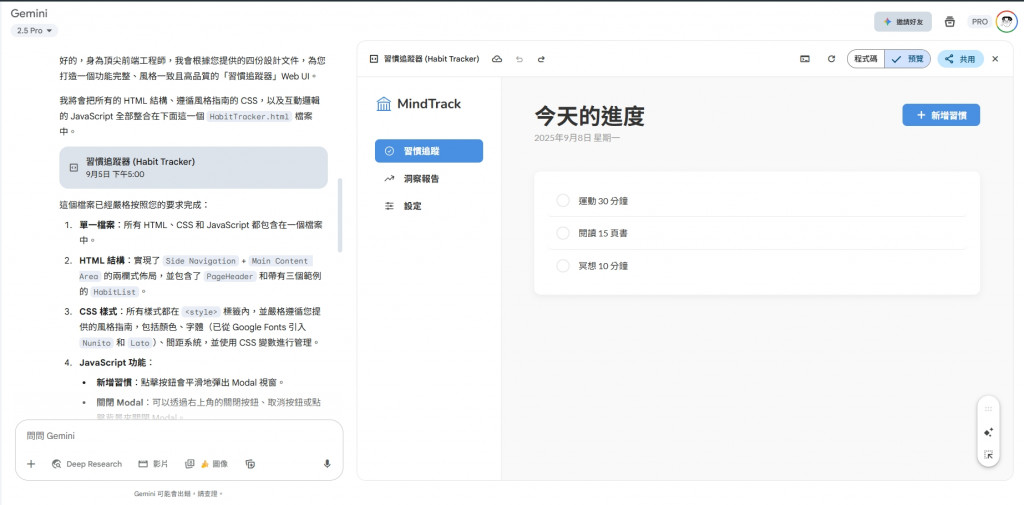
Gemini Canvas Preview

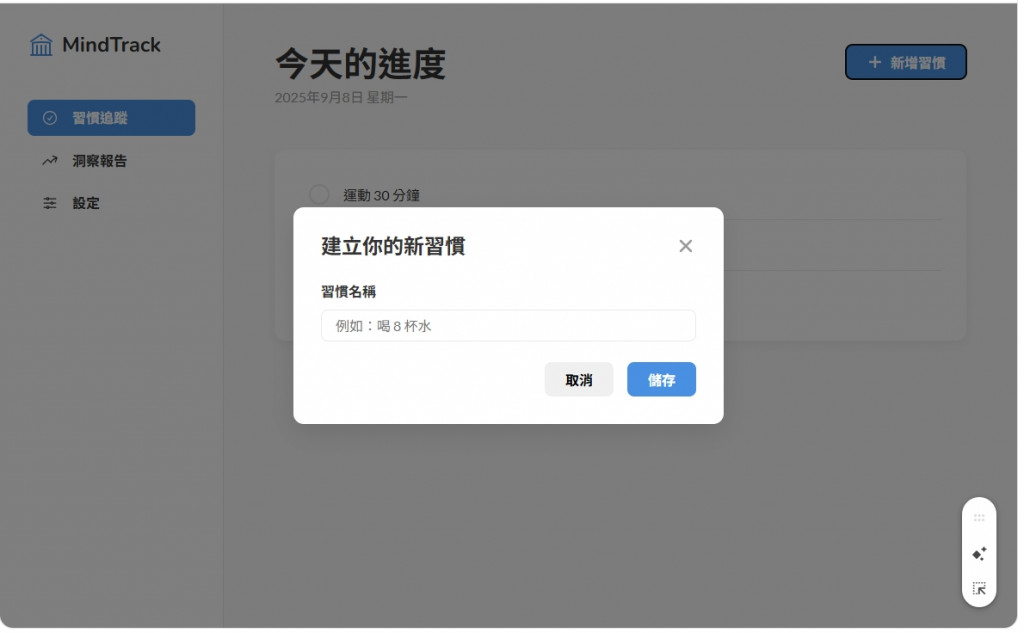
連彈出式的新增習慣也幫我們做好了

Add Habit Modal

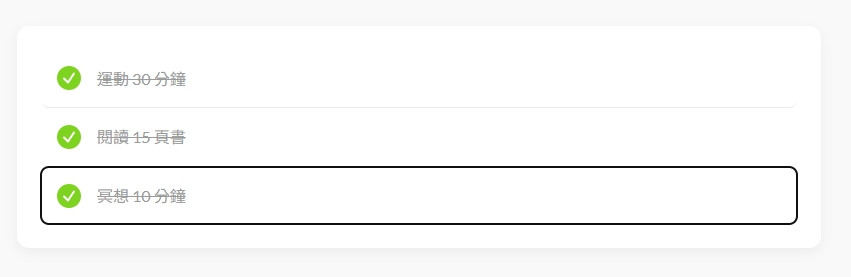
習慣的Check效果也完成了

Habit Check Effect

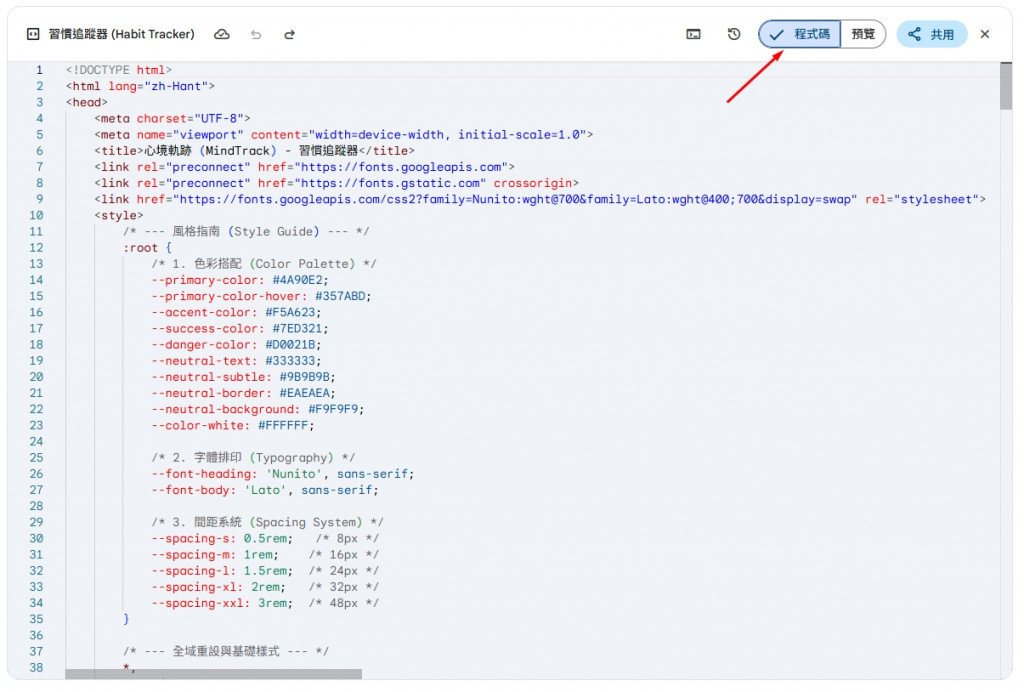
那我們這邊可以直接看到程式碼的部分

Code View

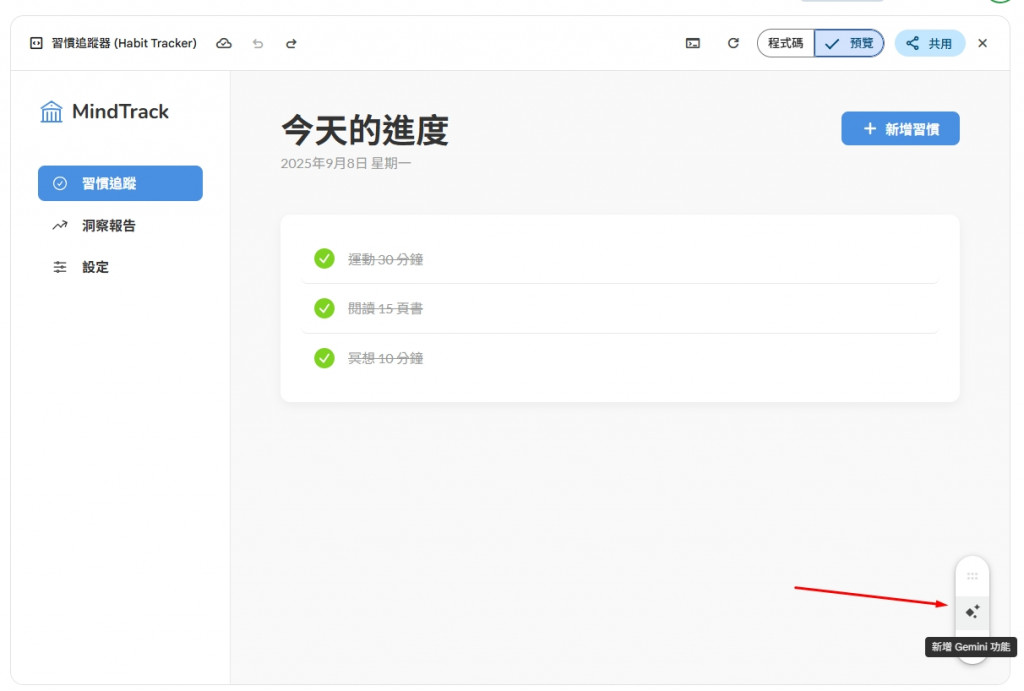
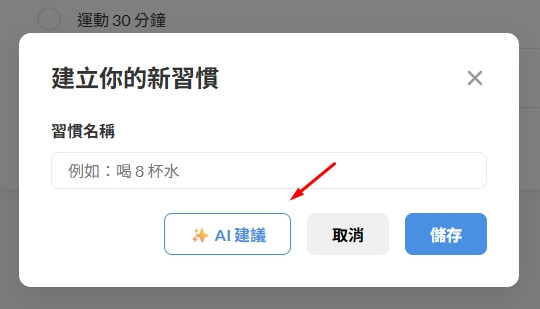
Gemini現在有新功能,可以幫我們導入AI

AI Suggestion Feature

按下去之後,找了一下發現幫我們導入在新增習慣的部分!

AI Integration

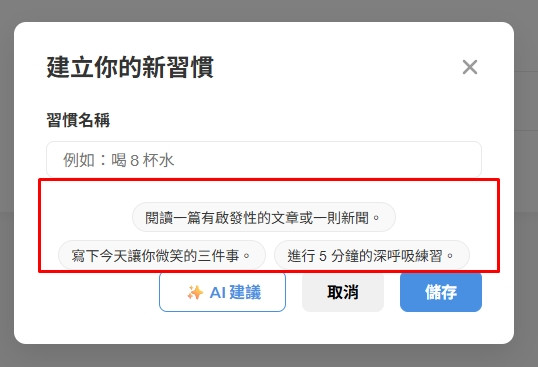
再點下去,他透過Gemini幫我們列出建議的習慣!!!

AI Habit Suggestions

當然後面AI生成的部分會先建議緩緩,等到真的完成MVP階段在看看有沒有要補上。 這邊是介紹給大家現在Gemini Canvas 有新增這樣的功能可以使用。

Part 4:初步分析:欣賞,並保持專業的挑剔

優點:

專業的思考 (伏筆):

然而,身為一個追求卓越的「結構工程師」,我們很快就會發現一個問題:這棟房子太完美了,完美到像是一體成形的藝術品,它的牆壁、水管、電線全都焊死在了一起。

雖然它現在能動,但如果未來我們要單獨升級電路系統(修改 JS),或是重新粉刷某面牆(修改 CSS),都會變得非常困難。對於一個需要長期維護的專案來說,我們可以讓它的「內部結構」變得更專業、更有條理。

結語:超高速原型開發的勝利

再次恭喜!今天,我們體驗了一次足以改變工作流程的視覺魔法。我們在短短幾分鐘內,就完成了一個傳統流程下可能需要幾個小時才能完成的、高品質的 UI 原型。

我們手上現在有了一份由 AI 親手打造的、功能齊全的程式碼。明天,我們將正式回到我們的 VS Code 開發環境,扮演一位專業的「結構工程師」,為這棟由魔法召喚出來的精美建築,進行一次專業級的「結構重構」,將它從一個華麗的原型,改造成一個可長期維護的、結構清晰的專業前端專案!

Day 20: 【前端 #1】Gemini Canvas 生成UI (還有新的AI建議功能)

發布於 2025年9月8日 (更新於 2025年9月8日) · 約 7 分鐘閱讀 · 2025iThomeIronman Gemini Canvas Frontend Prototyping UI

安安,我是 ChiYu!

昨天,我們完成了前端開發的最後一份規劃文件。至此,我們所有的「左手藍圖」工作,全部大功告成!

從今天起,我們將正式拿起工具,戴上安全帽,開始 Vibe Coding 的前端實作!但… 我們真的要像傳統的「建築工人」那樣,一行一行地去搭建 HTML 骨架,再一點一點地去粉刷 CSS 樣式嗎?

不!時代變了!今天,我們要直接從「建築工人」一步到位,升級成「魔法建築師」!我們不再一磚一瓦地蓋房子,我們要直接攤開我們的設計藍圖,對著 Gemini 詠唱咒語,瞬間召喚出一棟功能完整、外觀精美的 UI 原型!

Part 1:為什麼要用 Canvas?—— 從「盲人摸象」到「上帝視角」

在 Day 12,我們體驗了在終端機 Vibe Coding 的快感。它很酷,但對於 UI 開發來說,它有個小缺點:我們就像是在黑暗中「盲人摸象」,敲下一行指令,然後切換到瀏覽器看看成果,來來回回,效率不高。

而 Gemini Web UI 的 Canvas 功能,則給了我們截然不同的體驗——「上帝視角」。

Canvas 是一個視覺化的 AI 互動介面,它能讓我們在描述需求的同時,即時預覽 AI 生成的 UI 畫面。它追求的是 「極速視覺化」,讓我們能在幾分鐘內,就得到一個可以直接互動、外觀精美的 UI 原型。這對於前端開發來說,簡直是夢幻般的工具!

Part 2:Canvas 實戰:為 AI 建築師提供「設計圖」

現在,讓我們打開我們的「魔法實驗室」—— gemini.google.com,然後選擇 Canvas 功能。我們要學習一門全新的 Prompt 技巧:如何用文字,向一位魔法建築師描述一棟房子?

答案很簡單:把我們嘔心瀝血產出的設計文件餵給它!

【魔法詠唱:UI 生成咒語】

# 角色 (Role)
你是一位頂尖的前端工程師,精通 HTML, CSS, JavaScript,並且對 UI/UX 設計有深刻的理解。

# 目標 (Objective)
請根據我提供的設計文件和詳細需求,為我生成一個功能完整的「習慣追蹤器」Web UI 的**單一 HTML 檔案**

# 上下文 (Context)

- **風格指南**: STYLE_GUIDE.md
- **佈局與元件**: LAYOUT_COMPONENTS.md
- **核心使用者故事**: USER_STORIES.md
- **專案章程**: PROJECT_CHARTER.md

---

## 你的任務與產出要求 (Your Task & Output Requirements)
1. **單一檔案**: 請將所有的 HTML, CSS, 和 JavaScript 都寫在同一個 `.html` 檔案中。
2. **HTML 結構**:
- 嚴格遵循「佈局與元件」文件中定義的兩欄式佈局 (`Side Navigation` + `Main Content Area`)。
-`Main Content Area` 中,實現 `PageHeader``HabitList` 元件。
- `HabitList` 中請包含至少三個靜態的習慣項目作為範例。
3. **CSS 樣式**:
- 嚴格遵循「風格指南」中定義的顏色、字體和間距系統。
- 所有樣式都必須寫在 `<style>` 標籤中。
4. **JavaScript 功能**:
- 所有的互動邏輯都必須寫在 `<script>` 標籤中。
- 實現「新增習慣」按鈕的功能:點擊後會彈出一個 Modal 視窗。
- 實現 Modal 視窗的關閉功能。
- 實現習慣項目的「打卡」功能:點擊習慣項目後,會有視覺上的變化(例如加上刪除線)。

Gemini Canvas Prompt

當你把這個包含了所有設計細節的交給Gemini時,要記得點選Canvas的選項。

Part 3:成果展示:見證魔法召喚的建築

只需片刻,Gemini Canvas 就會在你面前,呈現出一個讓你驚嘆的成果:

左邊是精美的 UI 即時預覽,右邊是滾動的程式碼。

這就是我們召喚出來的 UI 原型!它不只是一張圖片,它是一個可以立刻下載、可以立刻互動的真實網頁!

讓我們來欣賞一下 AI 建築師的傑作:

(程式碼有點長,但我還是打算全部放上來,太長可以滑下去就好,後面有更精華的說明)

<!DOCTYPE html>
<html lang="zh-Hant">
<head>
    <meta charset="UTF-8">
    <meta name="viewport" content="width=device-width, initial-scale=1.0">
    <title>心境軌跡 (MindTrack) - 習慣追蹤器</title>
    <link rel="preconnect" href="https://fonts.googleapis.com">
    <link rel="preconnect" href="https://fonts.gstatic.com" crossorigin>
    <link href="https://fonts.googleapis.com/css2?family=Nunito:wght@700&family=Lato:wght@400;700&display=swap" rel="stylesheet">
    <style>
        /* --- 風格指南 (Style Guide) --- */
        :root {
            /* 1. 色彩搭配 (Color Palette) */
            --primary-color: #4A90E2;
            --primary-color-hover: #357ABD;
            --accent-color: #F5A623;
            --success-color: #7ED321;
            --danger-color: #D0021B;
            --neutral-text: #333333;
            --neutral-subtle: #9B9B9B;
            --neutral-border: #EAEAEA;
            --neutral-background: #F9F9F9;
            --color-white: #FFFFFF;
            
            /* 2. 字體排印 (Typography) */
            --font-heading: 'Nunito', sans-serif;
            --font-body: 'Lato', sans-serif;

            /* 3. 間距系統 (Spacing System) */
            --spacing-s: 0.5rem;   /* 8px */
            --spacing-m: 1rem;    /* 16px */
            --spacing-l: 1.5rem;  /* 24px */
            --spacing-xl: 2rem;   /* 32px */
            --spacing-xxl: 3rem;  /* 48px */
        }

        /* --- 全域重設與基礎樣式 --- */
        *,
        *::before,
        *::after {
            box-sizing: border-box;
            margin: 0;
            padding: 0;
        }

        body {
            font-family: var(--font-body);
            background-color: var(--neutral-background);
            color: var(--neutral-text);
            font-size: 16px;
            line-height: 1.6;
            -webkit-font-smoothing: antialiased;
            -moz-osx-font-smoothing: grayscale;
        }

        h1, h2, h3 {
            font-family: var(--font-heading);
            font-weight: 700;
            line-height: 1.2;
        }

        h1 { font-size: 2.5rem; }
        h2 { font-size: 2rem; }
        h3 { font-size: 1.5rem; }
        p { margin-bottom: var(--spacing-m); }
        p.subtitle { color: var(--neutral-subtle); font-size: 1rem; }

        /* --- 佈局 (Layout) --- */
        .app-layout {
            display: flex;
            min-height: 100vh;
        }

        .sidebar-nav {
            width: 260px;
            background-color: var(--color-white);
            border-right: 1px solid var(--neutral-border);
            padding: var(--spacing-xl);
            display: flex;
            flex-direction: column;
            flex-shrink: 0;
        }

        .main-content {
            flex-grow: 1;
            padding: var(--spacing-xxl);
            max-width: 900px;
            margin: 0 auto;
        }

        /* --- 元件 (Components) --- */
        
        /* Sidebar Navigation */
        .logo {
            display: flex;
            align-items: center;
            gap: var(--spacing-s);
            margin-bottom: var(--spacing-xxl);
        }

        .logo-icon {
            width: 32px;
            height: 32px;
            color: var(--primary-color);
        }

        .logo h2 {
            font-size: 1.5rem;
            color: var(--neutral-text);
        }

        .nav-list {
            list-style: none;
            display: flex;
            flex-direction: column;
            gap: var(--spacing-s);
        }

        .nav-item a {
            display: flex;
            align-items: center;
            gap: var(--spacing-m);
            padding: var(--spacing-s) var(--spacing-m);
            border-radius: 8px;
            text-decoration: none;
            color: var(--neutral-text);
            font-weight: 700;
            transition: background-color 0.2s, color 0.2s;
        }

        .nav-item a:hover {
            background-color: var(--neutral-background);
        }

        .nav-item.active a {
            background-color: var(--primary-color);
            color: var(--color-white);
        }
        
        .nav-item svg { width: 20px; height: 20px; }

        /* Page Header */
        .page-header {
            display: flex;
            justify-content: space-between;
            align-items: flex-start;
            margin-bottom: var(--spacing-xl);
        }

        /* Button */
        .btn {
            padding: var(--spacing-s) var(--spacing-l);
            border-radius: 8px;
            border: none;
            font-family: var(--font-body);
            font-size: 1rem;
            font-weight: 700;
            cursor: pointer;
            transition: background-color 0.2s, color 0.2s, border-color 0.2s;
            display: inline-flex;
            align-items: center;
            gap: var(--spacing-s);
        }

        .btn-primary {
            background-color: var(--primary-color);
            color: var(--color-white);
        }

        .btn-primary:hover {
            background-color: var(--primary-color-hover);
        }

        /* Habit List */
        .habit-list-container {
            background-color: var(--color-white);
            border-radius: 12px;
            padding: var(--spacing-l);
            box-shadow: 0 4px 12px rgba(0,0,0,0.05);
        }

        .habit-item {
            display: flex;
            align-items: center;
            gap: var(--spacing-m);
            padding: var(--spacing-m);
            border-radius: 8px;
            cursor: pointer;
            transition: background-color 0.2s;
            user-select: none;
        }

        .habit-item:not(:last-child) {
            border-bottom: 1px solid var(--neutral-border);
        }
        
        .habit-item:hover {
            background-color: var(--neutral-background);
        }

        .habit-name {
            flex-grow: 1;
            transition: color 0.3s, text-decoration 0.3s;
        }

        .habit-item.completed .habit-name {
            text-decoration: line-through;
            color: var(--neutral-subtle);
        }

        /* Custom Checkbox */
        .habit-checkbox {
            width: 24px;
            height: 24px;
            border: 2px solid var(--neutral-border);
            border-radius: 50%;
            display: flex;
            align-items: center;
            justify-content: center;
            transition: border-color 0.3s, background-color 0.3s;
            flex-shrink: 0;
        }

        .habit-checkbox svg {
            width: 16px;
            height: 16px;
            color: var(--color-white);
            opacity: 0;
            transform: scale(0.5);
            transition: opacity 0.3s, transform 0.3s;
        }

        .habit-item.completed .habit-checkbox {
            background-color: var(--success-color);
            border-color: var(--success-color);
        }

        .habit-item.completed .habit-checkbox svg {
            opacity: 1;
            transform: scale(1);
        }

        /* Modal */
        .modal-overlay {
            position: fixed;
            top: 0;
            left: 0;
            width: 100%;
            height: 100%;
            background-color: rgba(0, 0, 0, 0.5);
            display: flex;
            align-items: center;
            justify-content: center;
            opacity: 0;
            visibility: hidden;
            transition: opacity 0.3s, visibility 0.3s;
            z-index: 1000;
        }

        .modal-overlay.show {
            opacity: 1;
            visibility: visible;
        }

        .modal-content {
            background-color: var(--color-white);
            padding: var(--spacing-xl);
            border-radius: 12px;
            box-shadow: 0 10px 30px rgba(0,0,0,0.1);
            width: 90%;
            max-width: 500px;
            transform: scale(0.95);
            transition: transform 0.3s;
        }
        
        .modal-overlay.show .modal-content {
            transform: scale(1);
        }

        .modal-header {
            display: flex;
            justify-content: space-between;
            align-items: center;
            margin-bottom: var(--spacing-l);
        }
        
        .modal-header h3 {
             color: var(--neutral-text);
        }

        .close-button {
            background: none;
            border: none;
            cursor: pointer;
            color: var(--neutral-subtle);
            transition: color 0.2s;
        }
        
        .close-button:hover {
             color: var(--neutral-text);
        }

        .close-button svg {
            width: 24px;
            height: 24px;
        }
        
        /* Form Input */
        .form-group {
            margin-bottom: var(--spacing-l);
        }
        
        .form-group label {
            display: block;
            font-weight: 700;
            margin-bottom: var(--spacing-s);
        }
        
        .form-input {
            width: 100%;
            padding: var(--spacing-s) var(--spacing-m);
            border: 1px solid var(--neutral-border);
            border-radius: 8px;
            font-size: 1rem;
            font-family: var(--font-body);
            transition: border-color 0.2s, box-shadow 0.2s;
        }
        
        .form-input:focus {
            outline: none;
            border-color: var(--primary-color);
            box-shadow: 0 0 0 3px rgba(74, 144, 226, 0.2);
        }

        .modal-actions {
            display: flex;
            justify-content: flex-end;
            gap: var(--spacing-m);
        }

    </style>
</head>
<body>
    <div class="app-layout">
        <!-- 側邊導覽列 (Side Navigation) -->
        <aside class="sidebar-nav">
            <div class="logo">
                <svg class="logo-icon" xmlns="http://www.w3.org/2000/svg" fill="none" viewBox="0 0 24 24" stroke-width="1.5" stroke="currentColor">
                  <path stroke-linecap="round" stroke-linejoin="round" d="M12 21v-8.25M15.75 21v-8.25M8.25 21v-8.25M3 9l9-6 9 6m-1.5 12V10.332A48.36 48.36 0 0012 9.75c-2.551 0-5.056.2-7.5.582V21M3 21h18M12 6.75h.008v.008H12V6.75z" />
                </svg>
                <h2>MindTrack</h2>
            </div>
            <nav>
                <ul class="nav-list">
                    <li class="nav-item active">
                        <a href="#">
                            <svg xmlns="http://www.w3.org/2000/svg" fill="none" viewBox="0 0 24 24" stroke-width="1.5" stroke="currentColor"><path stroke-linecap="round" stroke-linejoin="round" d="M9 12.75L11.25 15 15 9.75M21 12a9 9 0 11-18 0 9 9 0 0118 0z" /></svg>
                            習慣追蹤
                        </a>
                    </li>
                    <li class="nav-item">
                        <a href="#">
                            <svg xmlns="http://www.w3.org/2000/svg" fill="none" viewBox="0 0 24 24" stroke-width="1.5" stroke="currentColor"><path stroke-linecap="round" stroke-linejoin="round" d="M2.25 18L9 11.25l4.306 4.307a11.95 11.95 0 015.814-5.519l2.74-1.22m0 0l-5.94-2.28m5.94 2.28l-2.28 5.941" /></svg>
                            洞察報告
                        </a>
                    </li>
                    <li class="nav-item">
                        <a href="#">
                             <svg xmlns="http://www.w3.org/2000/svg" fill="none" viewBox="0 0 24 24" stroke-width="1.5" stroke="currentColor"><path stroke-linecap="round" stroke-linejoin="round" d="M10.5 6h9.75M10.5 6a1.5 1.5 0 11-3 0m3 0a1.5 1.5 0 10-3 0M3.75 6H7.5m3 12h9.75m-9.75 0a1.5 1.5 0 01-3 0m3 0a1.5 1.5 0 00-3 0m-3.75 0H7.5m9-6h3.75m-3.75 0a1.5 1.5 0 01-3 0m3 0a1.5 1.5 0 00-3 0m-9.75 0h9.75" /></svg>
                             設定
                        </a>
                    </li>
                </ul>
            </nav>
        </aside>

        <!-- 主要內容區域 (Main Content Area) -->
        <main class="main-content">
            <!-- 頁面標頭 (PageHeader) -->
            <header class="page-header">
                <div>
                    <h1 id="page-title">今天的進度</h1>
                    <p id="page-subtitle" class="subtitle"></p>
                </div>
                <button class="btn btn-primary" id="add-habit-btn">
                    <svg xmlns="http://www.w3.org/2000/svg" width="20" height="20" viewBox="0 0 24 24" fill="none" stroke="currentColor" stroke-width="3" stroke-linecap="round" stroke-linejoin="round"><line x1="12" y1="5" x2="12" y2="19"></line><line x1="5" y1="12" x2="19" y2="12"></line></svg>
                    新增習慣
                </button>
            </header>

            <!-- 習慣列表 (HabitList) -->
            <section class="habit-list-container">
                <div class="habit-item" tabindex="0" role="button" aria-pressed="false">
                    <div class="habit-checkbox">
                       <svg xmlns="http://www.w3.org/2000/svg" fill="none" viewBox="0 0 24 24" stroke-width="3" stroke="currentColor"><path stroke-linecap="round" stroke-linejoin="round" d="M4.5 12.75l6 6 9-13.5" /></svg>
                    </div>
                    <span class="habit-name">運動 30 分鐘</span>
                </div>
                <div class="habit-item" tabindex="0" role="button" aria-pressed="false">
                    <div class="habit-checkbox">
                        <svg xmlns="http://www.w3.org/2000/svg" fill="none" viewBox="0 0 24 24" stroke-width="3" stroke="currentColor"><path stroke-linecap="round" stroke-linejoin="round" d="M4.5 12.75l6 6 9-13.5" /></svg>
                    </div>
                    <span class="habit-name">閱讀 15 頁書</span>
                </div>
                <div class="habit-item" tabindex="0" role="button" aria-pressed="true">
                    <div class="habit-checkbox">
                       <svg xmlns="http://www.w3.org/2000/svg" fill="none" viewBox="0 0 24 24" stroke-width="3" stroke="currentColor"><path stroke-linecap="round" stroke-linejoin="round" d="M4.5 12.75l6 6 9-13.5" /></svg>
                    </div>
                    <span class="habit-name">冥想 10 分鐘</span>
                </div>
            </section>
        </main>
    </div>

    <!-- 新增習慣 Modal 視窗 -->
    <div class="modal-overlay" id="add-habit-modal">
        <div class="modal-content">
            <header class="modal-header">
                <h3>建立你的新習慣</h3>
                <button class="close-button" id="close-modal-btn" aria-label="關閉視窗">
                     <svg xmlns="http://www.w3.org/2000/svg" width="24" height="24" viewBox="0 0 24 24" fill="none" stroke="currentColor" stroke-width="2.5" stroke-linecap="round" stroke-linejoin="round"><line x1="18" y1="6" x2="6" y2="18"></line><line x1="6" y1="6" x2="18" y2="18"></line></svg>
                </button>
            </header>
            <div class="modal-body">
                <div class="form-group">
                    <label for="habit-name-input">習慣名稱</label>
                    <input type="text" id="habit-name-input" class="form-input" placeholder="例如:喝 8 杯水">
                </div>
            </div>
            <footer class="modal-actions">
                <button class="btn" id="cancel-btn">取消</button>
                <button class="btn btn-primary">儲存</button>
            </footer>
        </div>
    </div>

    <script>
        document.addEventListener('DOMContentLoaded', () => {
            // --- 元素選擇 ---
            const addHabitBtn = document.getElementById('add-habit-btn');
            const addHabitModal = document.getElementById('add-habit-modal');
            const closeModalBtn = document.getElementById('close-modal-btn');
            const cancelBtn = document.getElementById('cancel-btn');
            const habitItems = document.querySelectorAll('.habit-item');
            const subtitle = document.getElementById('page-subtitle');

            // --- 功能 1: 設定今日日期 ---
            const setTodaysDate = () => {
                const today = new Date();
                const options = { year: 'numeric', month: 'long', day: 'numeric', weekday: 'long' };
                // 將語言地區設為 'zh-TW' 以顯示中文
                subtitle.textContent = today.toLocaleDateString('zh-TW', options);
            };

            setTodaysDate();

            // --- 功能 2: Modal 視窗開關 ---
            const openModal = () => addHabitModal.classList.add('show');
            const closeModal = () => addHabitModal.classList.remove('show');
            
            addHabitBtn.addEventListener('click', openModal);
            closeModalBtn.addEventListener('click', closeModal);
            cancelBtn.addEventListener('click', closeModal);
            // 點擊 Modal 背景也會關閉
            addHabitModal.addEventListener('click', (event) => {
                if (event.target === addHabitModal) {
                    closeModal();
                }
            });

            // --- 功能 3: 習慣打卡 ---
            habitItems.forEach(item => {
                const toggleHabit = () => {
                    item.classList.toggle('completed');
                    const isCompleted = item.classList.contains('completed');
                    item.setAttribute('aria-pressed', isCompleted);
                };

                item.addEventListener('click', toggleHabit);
                
                // 讓鍵盤使用者也能操作
                item.addEventListener('keydown', (event) => {
                    if (event.key === 'Enter' || event.key === ' ') {
                        event.preventDefault(); // 防止頁面滾動
                        toggleHabit();
                    }
                });
            });
        });
    </script>
</body>
</html>

實際看一下畫面

我們看一下使用 Gemini Canvas 的效果

Gemini Canvas Preview

連彈出式的新增習慣也幫我們做好了

Add Habit Modal

習慣的Check效果也完成了

Habit Check Effect

那我們這邊可以直接看到程式碼的部分

Code View

Gemini現在有新功能,可以幫我們導入AI

AI Suggestion Feature

按下去之後,找了一下發現幫我們導入在新增習慣的部分!

AI Integration

再點下去,他透過Gemini幫我們列出建議的習慣!!!

AI Habit Suggestions

當然後面AI生成的部分會先建議緩緩,等到真的完成MVP階段在看看有沒有要補上。 這邊是介紹給大家現在Gemini Canvas 有新增這樣的功能可以使用。

Part 4:初步分析:欣賞,並保持專業的挑剔

優點:

  • 驚人的完整性:它幾乎完美地實現了我們藍圖中的所有靜態畫面與核心互動。
  • 即時可用性:你可以直接把這份 HTML 檔案存下來,用瀏覽器打開,它就是一個可以動、可以玩的 UI 原型!
  • 忠於設計:顏色、字體、佈局,都嚴格遵循了我們的設計文件。

專業的思考 (伏筆):

然而,身為一個追求卓越的「結構工程師」,我們很快就會發現一個問題:這棟房子太完美了,完美到像是一體成形的藝術品,它的牆壁、水管、電線全都焊死在了一起。

雖然它現在能動,但如果未來我們要單獨升級電路系統(修改 JS),或是重新粉刷某面牆(修改 CSS),都會變得非常困難。對於一個需要長期維護的專案來說,我們可以讓它的「內部結構」變得更專業、更有條理。

結語:超高速原型開發的勝利

再次恭喜!今天,我們體驗了一次足以改變工作流程的視覺魔法。我們在短短幾分鐘內,就完成了一個傳統流程下可能需要幾個小時才能完成的、高品質的 UI 原型。

我們手上現在有了一份由 AI 親手打造的、功能齊全的程式碼。明天,我們將正式回到我們的 VS Code 開發環境,扮演一位專業的「結構工程師」,為這棟由魔法召喚出來的精美建築,進行一次專業級的「結構重構」,將它從一個華麗的原型,改造成一個可長期維護的、結構清晰的專業前端專案!

Part 20 of 32
  1. 01. Day 1: 【啟程】嘿,AI!我們來做個網站,但這次,我們約法三章
  2. 02. Day 2: 【心法篇】開發者的航海圖:什麼是文件驅動開發 (DDD)?
  3. 03. Day 3: 【工具篇 #1】萬丈高樓平地起:建置本地開發環境
  4. 04. Day 4: 【工具篇 #2】程式碼的時光機:Git 與 GitHub 版本控制
  5. 05. Day 5: 【工具篇 #3】終端機裡的魔法:什麼是 Vibe Coding 與 Gemini CLI?
  6. 06. Day 6: 【文件 #1】專案的靈魂:用 Gemini CLI 生成「專案章程」
  7. 07. Day 7: 【文件 #2】使用者的旅程:用 Gemini CLI 描繪「使用者故事」
  8. 08. Day 8: 【文件 #3】系統的心臟:用 Gemini CLI 設計「軟體架構文件」
  9. 09. Day 9: 【文件 #4】數據的家:用 Gemini 規劃「資料庫綱要」
  10. 10. Day 10: 【文件 #5】溝通的契約:用 Gemini 撰寫「Web API 規格書」
  11. 11. Day 11: 【心法 #2】透過AI幫我們生成Prompt
  12. 12. Day 12: 【後端 #1】起手式:AI 代理人 生成模組化的 Flask 專案
  13. 13. Day 13: 【後端 #2】AI 建築師:依藍圖自動建構 CRUD API
  14. 14. Day 14: 【DevOps #1】AI 品管員:設定 GitHub Actions 自動化程式碼檢查
  15. 15. Day 15: 【後端 #3】API 測試:用 Gemini CLI 輔助撰寫 Pytest
  16. 16. Day 16: 【整合篇】後端竣工!回顧與展望
  17. 17. Day 17: 【前端 #0】前端世界的基石: HTML, CSS 與 JavaScript
  18. 18. Day 18: 【文件 #6】網站的風格指南:用 Gemini 定義顏色與字體
  19. 19. Day 19: 【文件 #7】頁面的骨架:用 Gemini 規劃主佈局與元件拆分
  20. 20. Day 20: 【前端 #1】Gemini Canvas 生成UI (還有新的AI建議功能) Current
  21. 21. Day 21: 【前端 #2】從原型到架構:拆解並整合 AI 生成的 UI 程式碼
  22. 22. Day 22: 【前端 #3】AI 一鍵生成完整 App 靜態 UI
  23. 23. Day 23: 【前端 #4】非同步的藝術:深入 Fetch API 與 Promise
  24. 24. Day 24: 【前端 #5】狀態管理的哲學:讓 UI 成為數據的鏡子
  25. 25. Day 25: 【前端 #6】核心生命週期:一天搞定習慣的「增刪改查」與「打卡」
  26. 26. Day 26: 【前端 #7】用戶體驗的最後一哩路:優雅地處理載入與錯誤
  27. 27. Day 27: 【文件 #8】數據的畫布:用 Gemini 設計「圖表元件規格書」
  28. 28. Day 28: 【前端 #8】兌現承諾:根據規格書 Vibe Coding 關聯性洞察圖表
  29. 29. Day 29: 【文件 #9】專案的守衛:用 Gemini 規劃「前端認證流程」
  30. 30. Day 30: 【前端 #9】建立大門與鑰匙:根據流程圖實現前端使用者認證
  31. 31. Day 31: 【優化篇】代碼的整形外科:JavaScript 模組化與代碼重構
  32. 32. 【完賽感言】左手藍圖,右手魔法:一趟旅程的結束與反思